Composing Agents, Sub-Agents, Skills, and Sub-Skills: A Decision Framework for Product Builders
The architecture decisions that determine whether your AI workflow scales or collapses
Product managers adopting Claude Code face a recurring challenge: understanding when to use agents versus skills, how to compose them, and why context window management determines success or failure at scale. This reference documents the mental models, decision frameworks, and implementation patterns that separate effective AI-assisted development from expensive context overflow.
The core insight: agents define behavior; skills define tools.1 When you conflate them, you lose the separation of concerns that enables composability.
The Fundamental Distinction: Behavior vs. Tooling
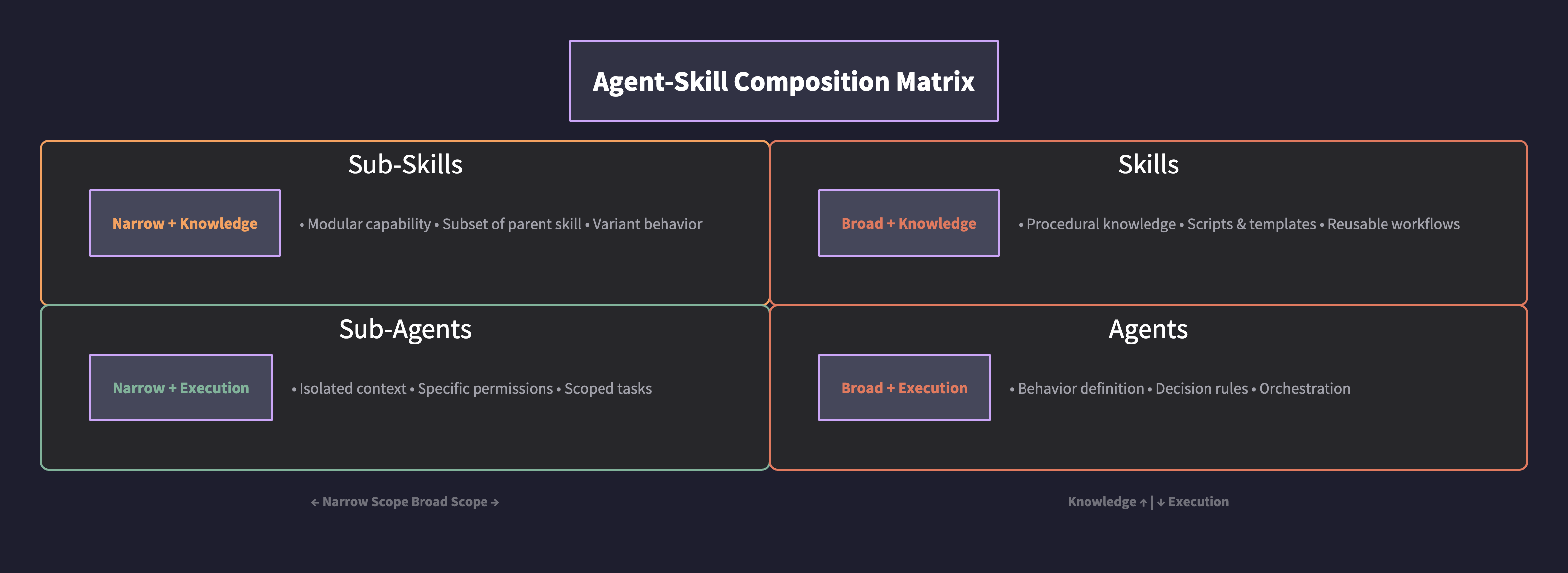
The distinction maps to a fundamental software engineering principle: separation of concerns.
| Component | Primary Function | Contains | Triggered By |
|---|---|---|---|
| Agent | Behavior definition | What it should/shouldn’t do, tone, decision rules | Orchestrator assignment |
| Skill | Procedural knowledge | How to use tools, scripts, templates | Task context matching |
| Sub-Agent | Scoped execution | Isolated context window, specific permissions | Parent agent delegation |
| Sub-Skill | Modular capability | Subset of parent skill, referenced when variant needed | Parent skill |
The analogy: An agent is a role (React Developer). A skill is a toolset (Linear integration). You hire the React Developer (agent) and equip them with the Linear skill. The agent’s markdown file describes behavior—strict typing, no any types, component patterns. The skill’s markdown file describes execution—how to create issues, update status, format labels.2
Context Window Economics: Why This Matters
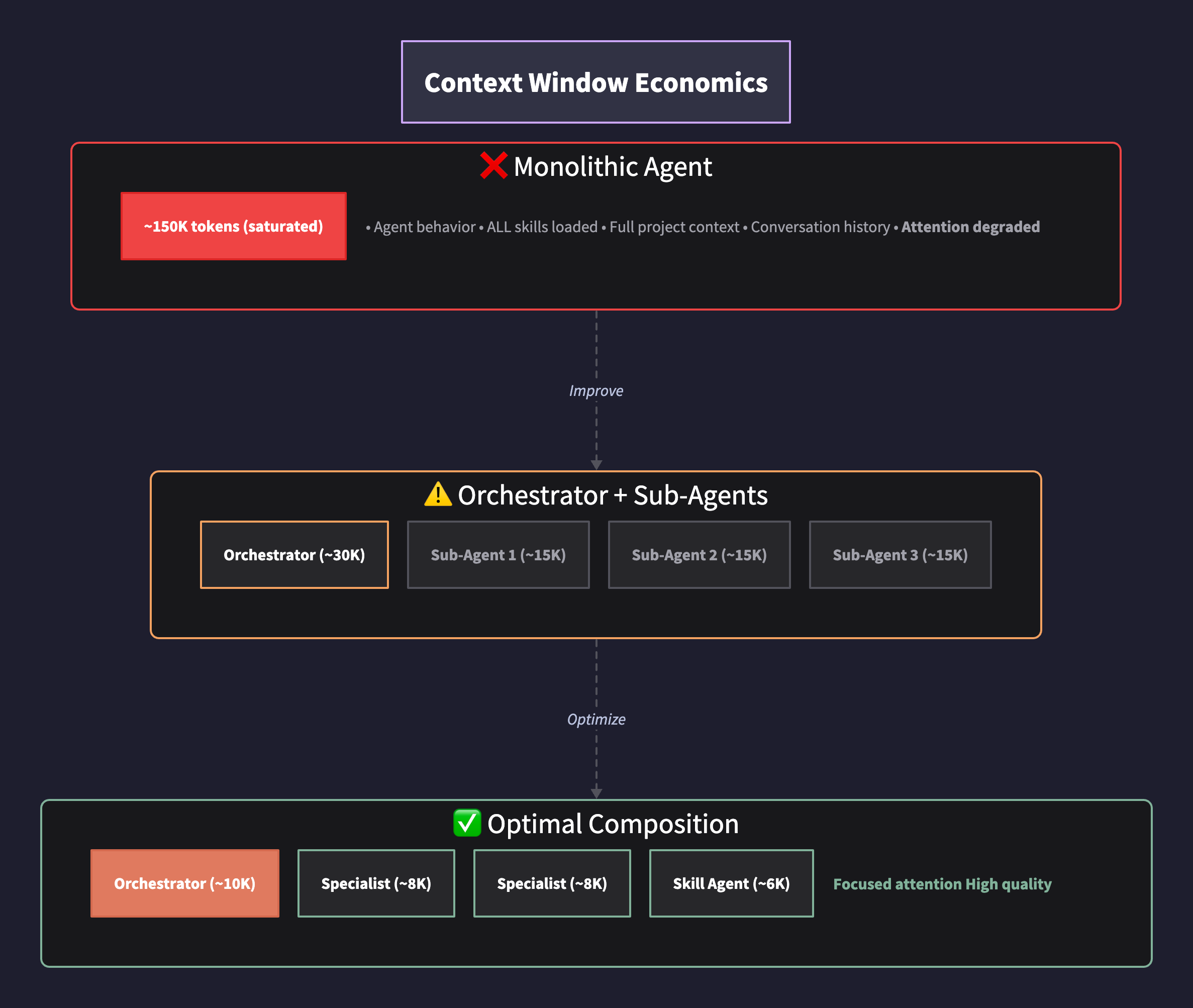
The constraint that shapes all decisions: attention degrades as context grows.
The Transformer architecture that powers Claude relies on self-attention mechanisms to weight relationships between tokens.3 As context length increases, the model must distribute attention across more tokens, which can dilute focus on the most relevant information—a phenomenon researchers call “lost in the middle.”4
When you load a detailed agent file, a comprehensive skill file, and accumulate conversation history, you can reach 100,000+ tokens before executing meaningful work. The practical consequence: instructions get ignored, outputs degrade, and the model loses track of constraints specified early in the context.
The principle:
Minimizing tokens while maximizing relevance produces the highest quality outputs.
This is why:
- Each sub-agent should receive only the context required for its specific task
- Skills should be modular and loaded only when needed
- Parent agents should delegate rather than accumulate
The Delegation Architecture
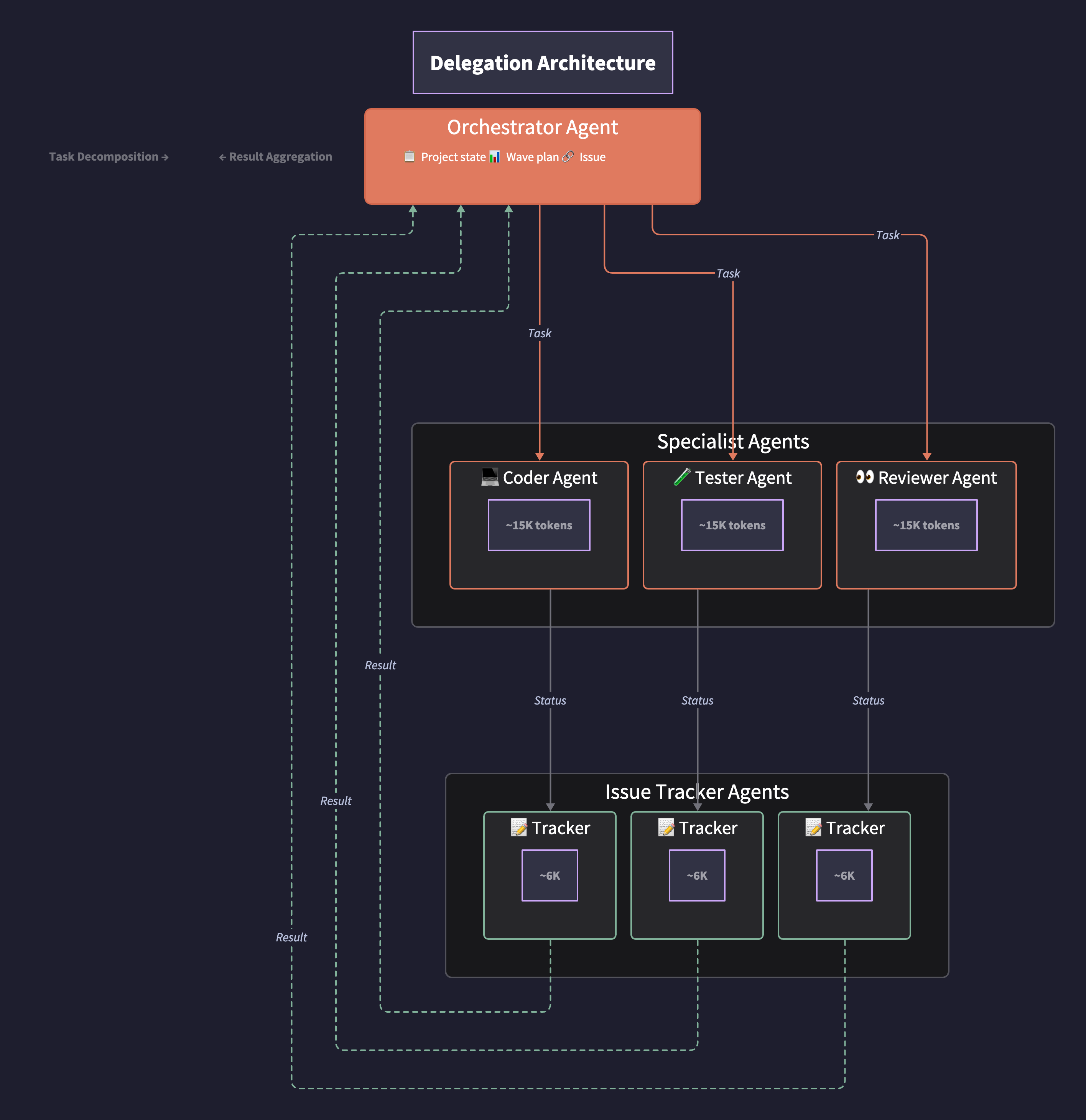
The pattern in practice:
- Orchestrator agent receives the full project context—issues from Linear, wave plan, dependencies
- Orchestrator spawns specialist agents (React, Supabase, Testing) with only their relevant scope
- Each specialist agent, upon task completion, spawns a Linear agent to update issue status
- Linear agent operates in parallel, returns confirmation, terminates
- Specialist reports completion to orchestrator
What this achieves (illustrative token counts):
- React agent context: ~15K tokens (agent behavior + React skill + specific component context)
- Linear agent context: ~8K tokens (Linear skill + status update prompt)
- Neither agent pollutes the other’s context window
- Orchestrator maintains project-level awareness without execution-level noise
Decision Framework: When to Create What
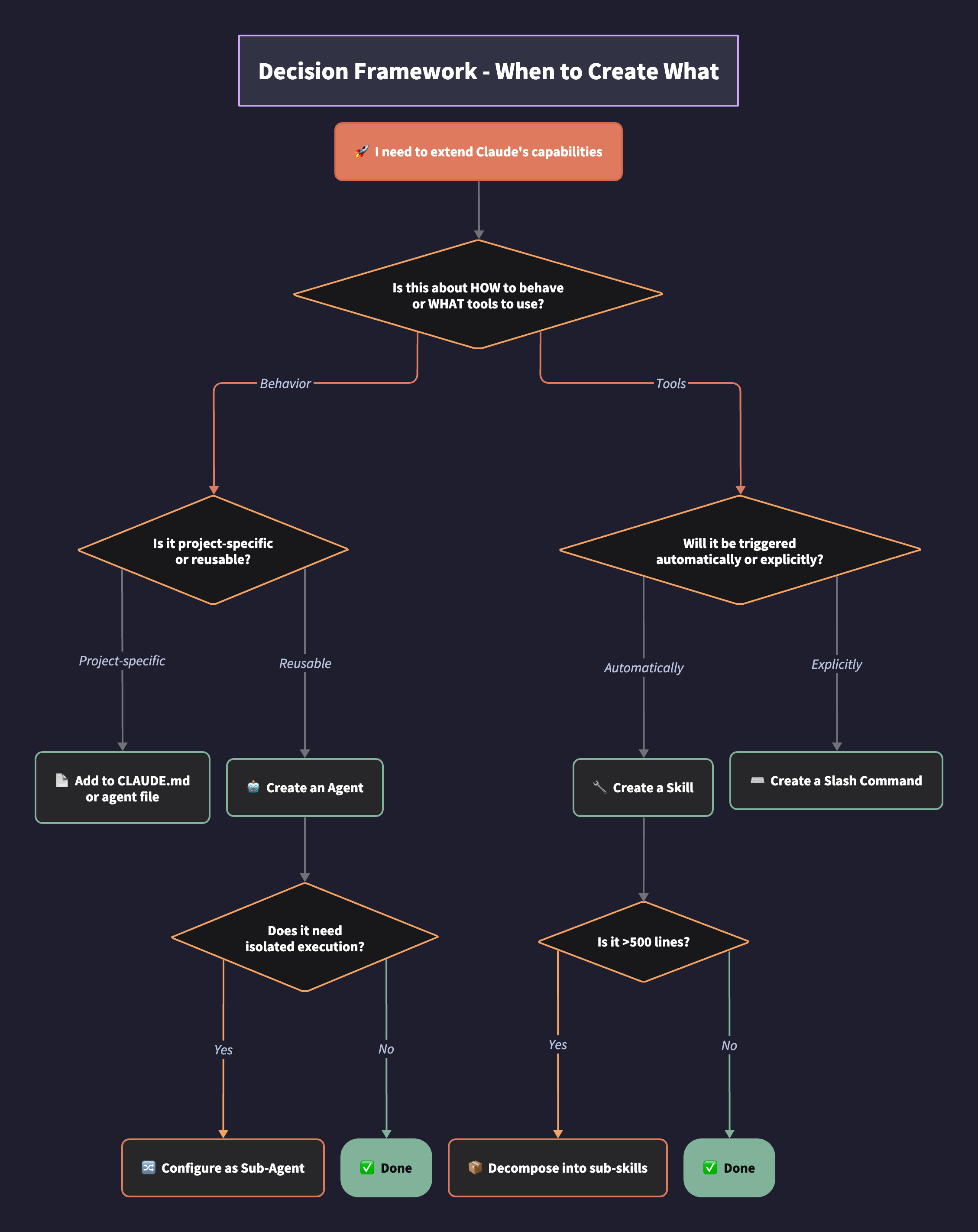
Use an Agent when:
- Defining personality, tone, or decision-making style
- Specifying constraints (what the agent should NOT do)
- Establishing domain expertise (e.g., “you are a security auditor”)
- Setting communication patterns with other agents
Use a Skill when:
- Packaging procedural knowledge (how to use Linear, how to write tests)
- Bundling scripts, templates, or reference documentation
- Creating reusable workflows that any agent might need
- Enabling automatic tool discovery based on task context1
Use a Sub-Agent when:
- Task requires isolated context (parallel execution without interference)2
- Different permission scopes needed (read-only vs. write access)
- Delegating to cheaper/faster models for specific subtasks
- Maintaining clean separation for eventual merge/review
Use a Sub-Skill when:
- Parent skill becomes unwieldy (practitioner guideline: decompose above ~500 lines)5
- Variant behavior needed for specific contexts
- Modular components that compose into larger workflows
Skill Architecture: Progressive Disclosure
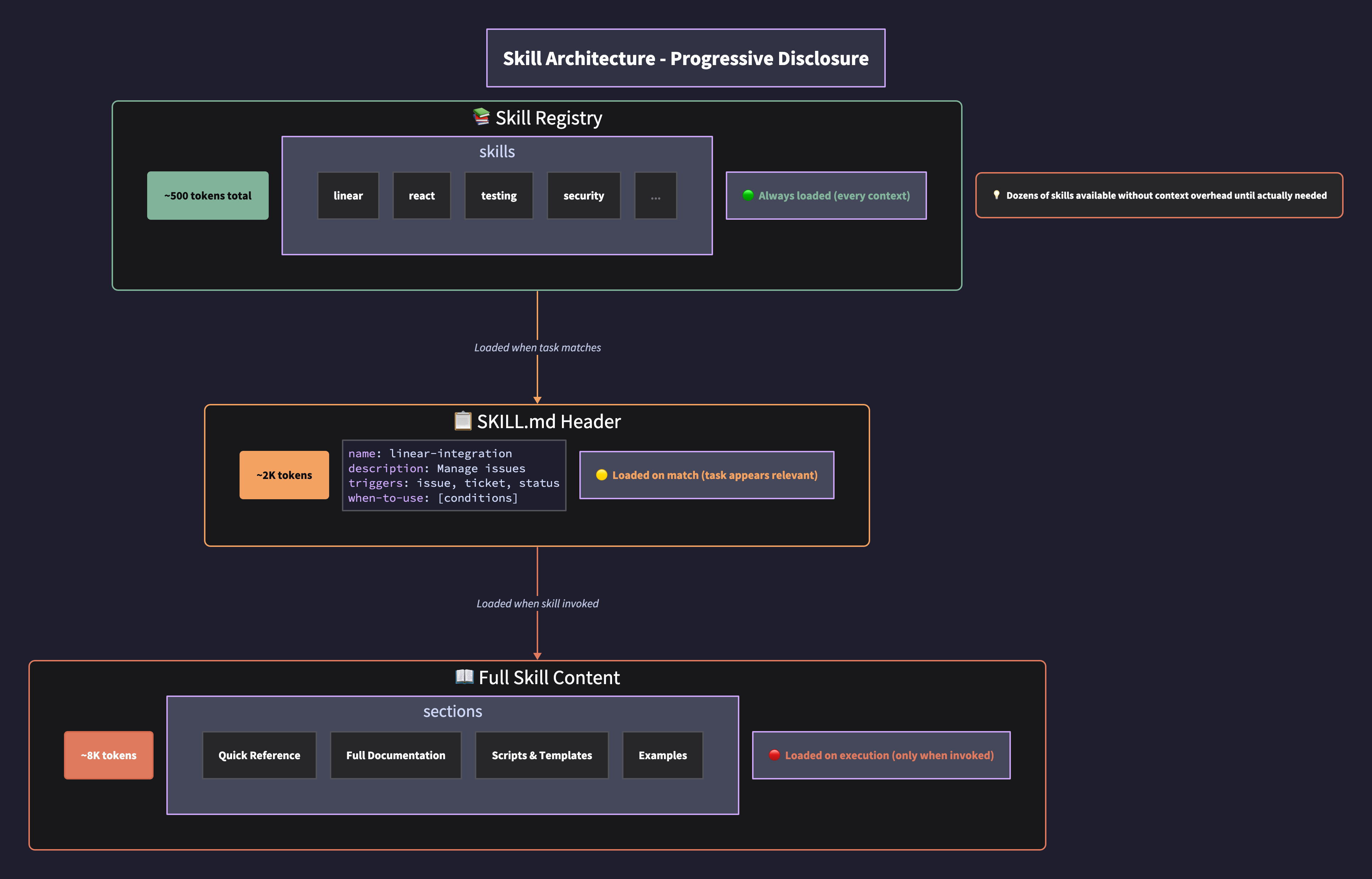
Skills implement progressive disclosure—loading information only as needed:1
- Registry level: Name and description loaded into every context (~50 tokens per skill)
- Header level: Metadata and trigger conditions loaded when task appears relevant (~500 tokens)
- Execution level: Full instructions, scripts, and templates loaded only when skill is invoked (~5-15K tokens)
This architecture means you can have dozens of skills available without context overhead until they’re actually needed.
Skill structure best practices:
---
name: linear-integration
description: Create, update, and manage Linear issues and projects
---

## When to Use
- User mentions issues, tickets, or project management
- Task involves updating work status
- Need to create structured project breakdowns

## Quick Reference
[Most common operations]

## Full Documentation
[Comprehensive instructions - loaded only when actively using]

## Scripts
[Python/bash scripts for deterministic operations]
Skill-Initiated Sub-Agents: The Daisy-Chain Pattern

This pattern emerged from a specific problem: you want specialist agents to update Linear when they complete work, but you don’t want Linear’s context polluting the specialist’s execution window.
The naive approach fails:
React Agent context:
- Agent behavior (React patterns, strict typing)
- React skill (component conventions)
- Linear skill (issue management)  ← Unnecessary during implementation
- Task context (specific component to build)
- Conversation history
= 80K+ tokens, diluted attention
The daisy-chain pattern:
- React Agent has an
agent.mdfile defining behavior - At the bottom of
agent.md: “When task is complete, update Linear with status” - React Agent completes work → reads instruction → invokes Linear skill
- Linear skill header contains: “When invoked, spawn a parallel agent for execution”
- Linear Agent spawns with only: Linear skill + status update prompt (~8K tokens)
- Linear Agent updates issue → reports success → terminates
- React Agent receives confirmation → reports to Orchestrator
What makes this different from standard delegation:
| Standard Sub-Agent | Skill-Initiated Sub-Agent |
|---|---|
| Parent agent decides when to delegate | Skill’s header defines spawn behavior |
| Parent explicitly calls sub-agent | Agent invokes skill; skill triggers spawn |
| Delegation logic lives in orchestrator | Delegation logic lives in skill definition |
| Requires orchestrator awareness of all sub-agents | Skills self-manage their execution model |
The implementation pattern:
In your agent file (react-developer.md):
## Completion Protocol
When implementation is complete:
1. Verify all tests pass
2. Update Linear with completion status (invoke linear skill)
3. Report summary to orchestrator
In your skill file (linear.md) header:
---
name: linear-integration
description: Manage Linear issues and projects
execution: parallel-agent
---

## Execution Model
This skill spawns a dedicated parallel agent for all operations.
The invoking agent should pass:
- Issue identifier
- Status update
- Optional: time logged, blockers encountered

The parallel agent will:
1. Authenticate with Linear
2. Execute the update
3. Return confirmation to invoking agent
Why this matters for composability:
The React agent doesn’t need to know how Linear updates happen. It just knows “invoke the Linear skill with this context.” The skill owns its execution model. Tomorrow you could change the Linear skill to use a synchronous call instead of a parallel agent—the React agent’s behavior file doesn’t change.
This is dependency inversion applied to agent architecture: high-level agents depend on skill abstractions, not on concrete sub-agent implementations.
Git Worktrees: Isolation Infrastructure
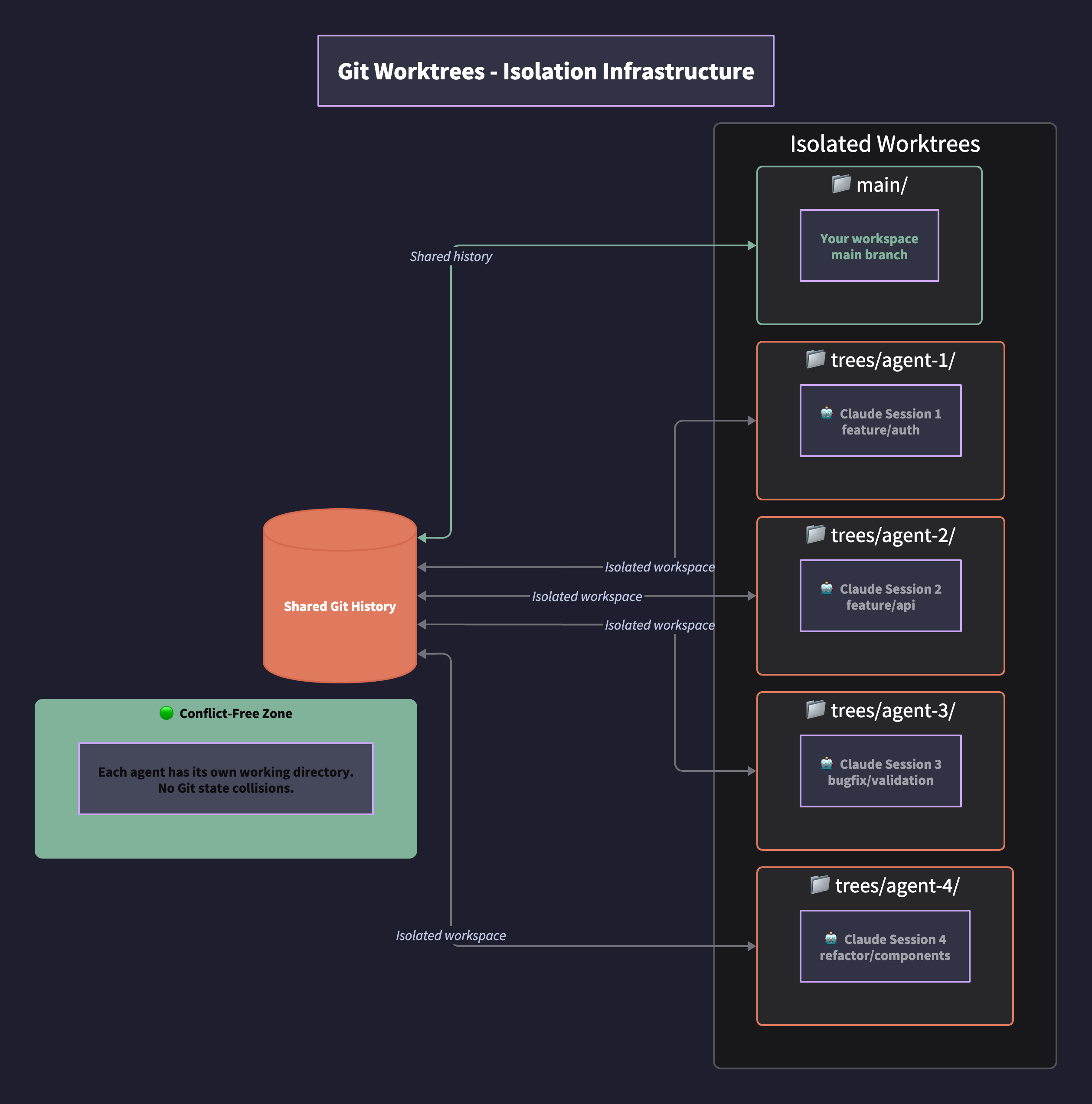
When running parallel agents, they can collide on the same .git state. Git worktrees solve this by providing each agent its own isolated working directory while sharing repository history.6
Worktree strategy decision matrix:
| Scenario | Strategy | Rationale |
|---|---|---|
| Sequential waves with shared dependencies | Single worktree, waves in sequence | Changes in wave 1 inform wave 2 |
| Independent features | One worktree per wave | Frontend and backend can parallelize |
| Maximum isolation (experimental) | One worktree per issue | Complete independence for comparison |
Setup pattern:
# Create worktrees for parallel agent work
git worktree add trees/agent-auth feature/authentication
git worktree add trees/agent-api feature/api-refactor
git worktree add trees/agent-tests feature/test-coverage

# Each agent operates in its own directory
cd trees/agent-auth && claude  # Session 1
cd trees/agent-api && claude   # Session 2
cd trees/agent-tests && claude # Session 3
Orchestration Packages: Claude-Flow Pattern
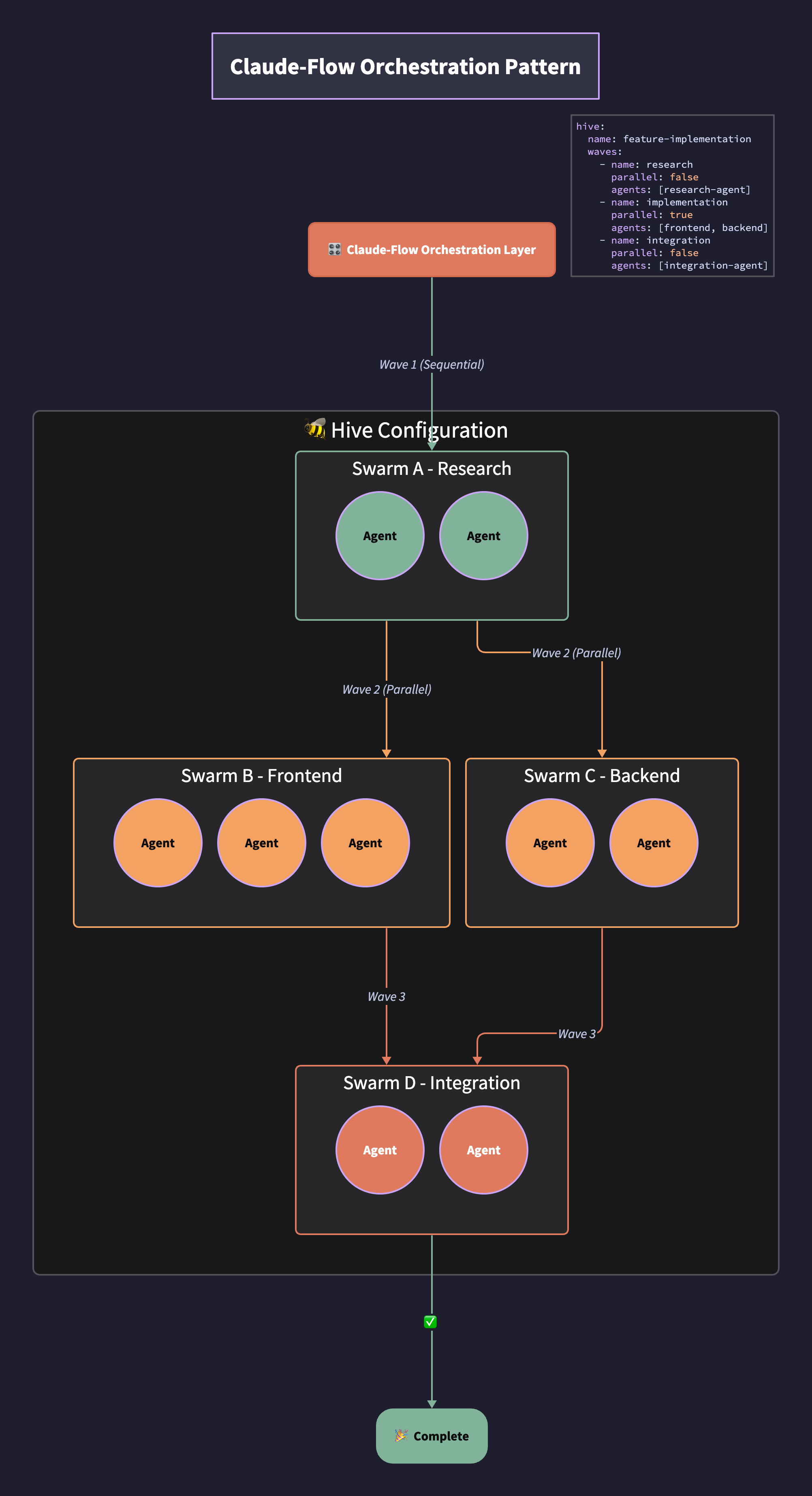
Claude-Flow (and similar orchestration packages) add structure for complex multi-agent workflows:
- Hives: Collections of agents configured for a project
- Swarms: Groups of agents that execute together
- Waves: Sequential or parallel execution batches
Configuration pattern:
hive:
  name: feature-implementation
  waves:
    - name: research
      parallel: false
      agents: [research-agent]
    - name: implementation
      parallel: true
      agents: [frontend-agent, backend-agent, test-agent]
    - name: integration
      parallel: false
      agents: [integration-agent]
The Composition Checklist
Before creating a new agent or skill, verify:
For Agents:
- Does it define behavior, not tooling?
- Is the agent file concise? (Practitioner guideline: under 500 lines)5
- Are tool-specific instructions extracted to skills?
- Does it specify what NOT to do, not just what to do?
- Can it operate with minimal context loaded?
For Skills:
- Is it concise enough to avoid context bloat? (Practitioner guideline: under 500 lines; decompose if larger)5
- Does the description enable accurate auto-discovery?
- Are scripts deterministic (no LLM reasoning required)?
- Is progressive disclosure implemented (quick reference vs. full docs)?
- Does it specify when to invoke a parallel agent?
For Sub-Agents:
- Is context isolation required for this task?
- Are permissions appropriately scoped?
- Is there a clear completion criteria?
- Does the parent agent know how to aggregate results?
Anti-Patterns to Avoid
-
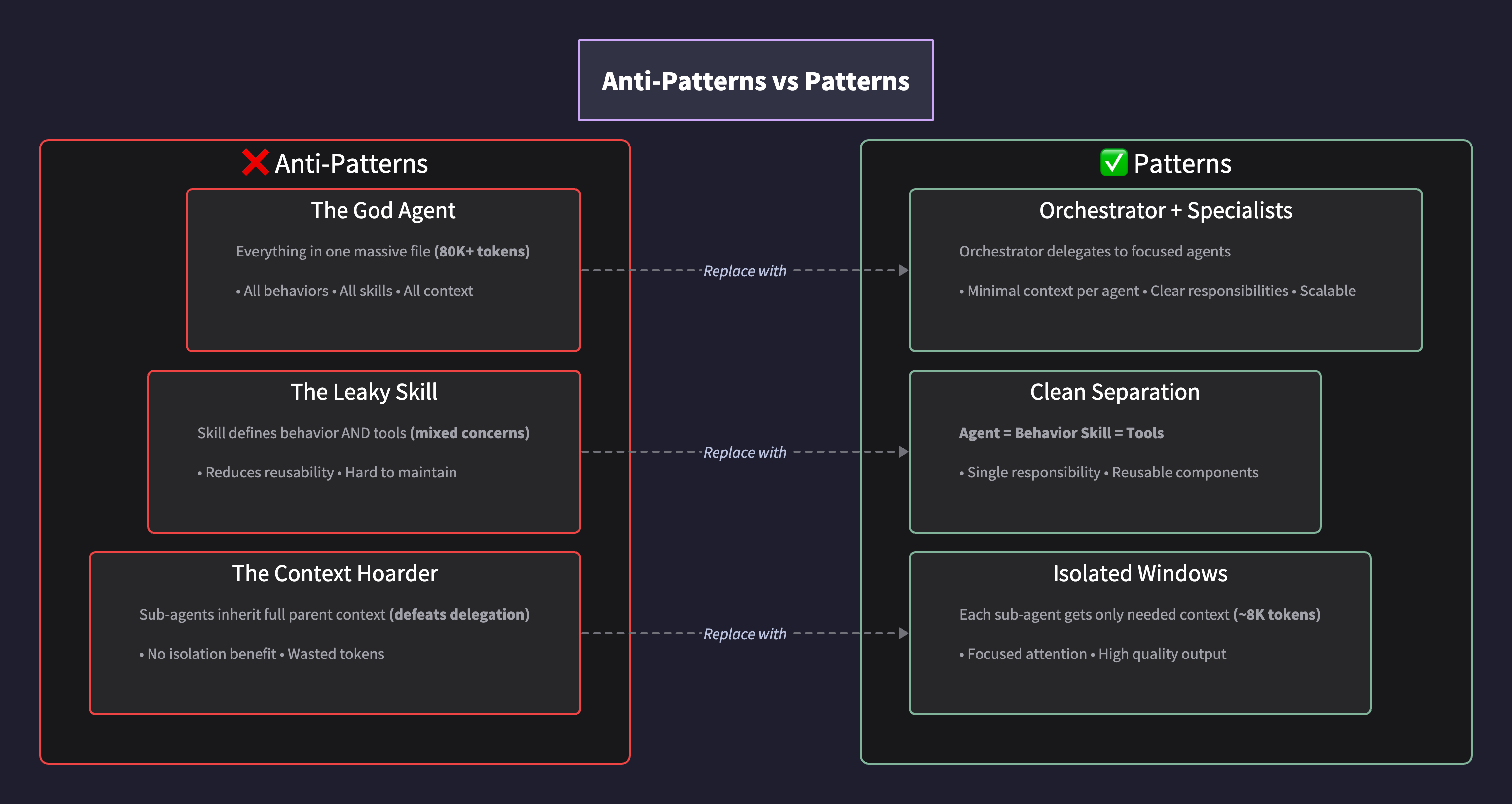
The God Agent: One massive agent file with all behaviors, skills, and context. Fails as complexity grows.
-
The Leaky Skill: A skill that includes behavioral instructions. Mixes concerns and reduces reusability.
-
The Context Hoarder: Sub-agents that inherit full parent context. Defeats the purpose of delegation.7
-
The Undocumented Completion: Sub-agents without clear done criteria. Parent agent can’t aggregate.
-
The Premature Decomposition: Breaking things into sub-skills before the parent skill reaches ~500 lines. Adds complexity without benefit.
Skill Lifecycle Management: From Personal Script to Portable Package
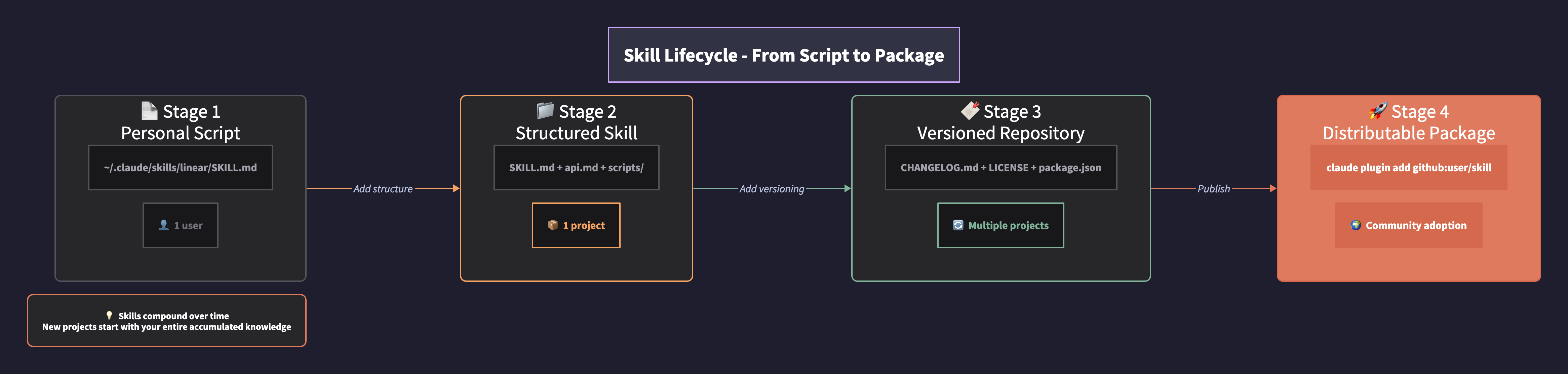
Skills accumulate value over time—but only if they’re structured for iteration and distribution. The pattern mirrors how senior engineers maintain scripts across decades: version everything, document changes, and make it portable.
Reference implementation: github.com/wrsmith108/linear-claude-skill
Repository Structure
linear-claude-skill/
├── skills/linear/
│   ├── SKILL.md          # Main skill instructions (entry point)
│   ├── api.md            # GraphQL API reference (sub-skill)
│   ├── sdk.md            # SDK automation patterns (sub-skill)
│   ├── sync.md           # Bulk sync patterns (sub-skill)
│   ├── scripts/
│   │   ├── query.ts      # Deterministic GraphQL runner
│   │   ├── query.sh      # Shell wrapper
│   │   └── sync.ts       # Bulk sync CLI tool
│   └── hooks/
│       └── post-edit.sh  # Auto-sync hook
├── CHANGELOG.md          # Version history
├── LICENSE               # MIT
├── README.md             # Installation + usage
└── package.json          # npm metadata for distribution
Key structural decisions:
| Element | Purpose | Benefit |
|---|---|---|
skills/linear/ nesting | Separates skill content from repo metadata | Clean installation path |
Sub-files (api.md, sdk.md) | Progressive disclosure within skill | Load GraphQL patterns only when needed |
scripts/ directory | Deterministic operations | No LLM reasoning for API calls |
hooks/ directory | Automation triggers | Post-edit sync without manual invocation |
Root CHANGELOG.md | Version documentation | Track iterations, communicate changes |
Changelog Discipline
Every skill modification gets a changelog entry. Format:
# Changelog

## [1.2.0] - 2025-01-20

### Added
- Bulk sync patterns via `sync.md`
- Hook-triggered sync after code edits

### Changed
- MCP reliability table updated with official Linear server

### Fixed
- GraphQL workaround for comment creation (MCP broken)

## [1.1.0] - 2025-01-15
...
Why this matters: When you return to a skill after weeks, the changelog tells you what changed and why. When you share with teammates, they understand the evolution.
Distribution Patterns
Level 1: Personal installation
# Clone to your skills directory
git clone https://github.com/wrsmith108/linear-claude-skill ~/.claude/skills/linear
Level 2: Plugin installation (recommended)
# Single command, handles updates
claude plugin add github:wrsmith108/linear-claude-skill
Level 3: npm package (for bundling)
# Create your own skill bundle
npm init -y
# Add skills as dependencies or devDependencies
# npm install @yourorg/linear-skill @yourorg/react-skill
Composing Skill Bundles
As you accumulate skills, create a personal “core” package:
// package.json for your skill bundle
{
  "name": "@yourhandle/claude-skills-core",
  "version": "1.0.0",
  "description": "My standard Claude Code skill set",
  "dependencies": {},
  "skills": [
    "linear",
    "react-conventions",
    "testing-patterns",
    "security-review"
  ]
}
Then for new projects:
# Install your entire skill stack
claude plugin add github:yourhandle/claude-skills-core
Versioning Strategy
| Change Type | Version Bump | Example |
|---|---|---|
| New capability | Minor (1.x.0) | Added bulk sync |
| Bug fix | Patch (1.0.x) | Fixed GraphQL timeout |
| Breaking change | Major (x.0.0) | Changed skill invocation pattern |
| Documentation only | No bump | Updated README |
Tag releases in Git:
git tag -a v1.2.0 -m "Add bulk sync patterns"
git push origin v1.2.0
The Accumulation Effect
This is what separates experienced practitioners from beginners: skills compound.
After six months:
- Your Linear skill handles edge cases you’ve encountered
- Your React skill encodes your team’s conventions
- Your testing skill knows your coverage thresholds
- Your security skill catches the vulnerabilities you’ve seen before
After a year:
- New projects start with your entire accumulated knowledge
- Onboarding teammates means sharing your skill bundle
- You’re not learning the same lessons twice
The engineers who talked about “scripts that reference scripts that reference scripts accumulated over decades”—this is the AI-native equivalent.
Implementation Sequence
For product managers building their first multi-agent workflow:
-
Start with one agent, one skill. Get the separation of concerns right before adding complexity.
-
Add Linear skill early. Issue tracking creates the feedback loop for improvement.
-
Introduce sub-agents when context overflows. You’ll know—outputs degrade, instructions get ignored.
-
Add worktrees when running parallel. Don’t wait for the first Git collision.
-
Document in changelogs. Each skill gets a changelog.md tracking iterations.
-
Publish under MIT. Your skills become portable across projects and shareable with teams.
Sources
-
Anthropic. “Equipping Agents for the Real World with Agent Skills.” Anthropic Engineering Blog, 2025. https://www.anthropic.com/engineering/equipping-agents-for-the-real-world-with-agent-skills
-
Anthropic. “Create Custom Subagents.” Claude Code Documentation, 2025. https://code.claude.com/docs/en/sub-agents
-
Vaswani, Ashish, et al. “Attention Is All You Need.” Advances in Neural Information Processing Systems, vol. 30, 2017. https://arxiv.org/abs/1706.03762
-
Liu, Nelson F., et al. “Lost in the Middle: How Language Models Use Long Contexts.” Transactions of the Association for Computational Linguistics, vol. 12, 2024, pp. 157-173. https://arxiv.org/abs/2307.03172
-
HumanLayer. “Writing a Good CLAUDE.md.” HumanLayer Blog, 25 Nov. 2025. https://www.humanlayer.dev/blog/writing-a-good-claude-md
-
Mitchinson, Nick. “Using Git Worktrees for Multi-Feature Development with AI Agents.” nrmitchi.com, Oct. 2025. https://www.nrmitchi.com/2025/10/using-git-worktrees-for-multi-feature-development-with-ai-agents/
-
LangChain. “How and When to Build Multi-Agent Systems.” LangChain Blog, 16 June 2025. https://www.blog.langchain.com/how-and-when-to-build-multi-agent-systems/
This article is a reference companion to the Maven course “Zero to One: Building Products with Claude Code.” For hands-on practice with these patterns, see the course materials.